Karpenter in production: what a 1,000-cluster migration teaches
Salesforce moved 1,000+ EKS clusters from Cluster Autoscaler to Karpenter. What the case really shows, three traps to avoid, and a staged rollout.
Viktor Vedmich · 17 min read
Salesforce runs more than 1,000 Amazon EKS clusters, and since mid-2025 it has been moving them from Cluster Autoscaler to Karpenter. The case study on the AWS Architecture Blog, co-written by Salesforce and AWS, lists what changed. Before you read it, guess which number is the biggest.
It is not the savings. Manual operational overhead dropped by 80%, through automation and self-service node pools. Scaling latency went from minutes to seconds. Thousands of node groups are gone. Here is the counter-intuitive part: the cost line is the modest one. Salesforce saved 5% in FY2026 through better bin-packing and less idle capacity, and projects another 5 to 10% for FY2027 as the rollout continues.
At that scale, single digits still matter. But the case does not say “Karpenter halves your bill”. It says Karpenter takes a lot of toil off the platform team, and that the hard part is disruption. The lessons Salesforce lists are overly restrictive PodDisruptionBudgets that blocked node replacements, parallel cordoning that hurt cluster health, and consolidation that hit single-replica pods.
This post follows the same shape: why Karpenter behaves differently, three traps that turn its strengths against you, a staged rollout, and what to watch. The configs target the karpenter.sh/v1 API and are checked against the Karpenter v1.14 docs. Full disclosure: I work at AWS.
Why Karpenter is different
Cluster Autoscaler scales node groups. Karpenter scales nodes.
That sounds like wordplay until you look at the mechanics. Cluster Autoscaler checks every 10 seconds (by default) for pods the scheduler could not place, finds a node group whose template would fit them, and raises that group’s size. On AWS, the Auto Scaling group then launches the instance. Cluster Autoscaler assumes every node in a group has the same shape, so every new shape means another node group. That is how Salesforce ended up with thousands of them.
Karpenter skips the group. It watches for unschedulable pods and batches them (by default, the window closes after 1 second without new pods, 10 seconds at most). Then it bin-packs them by resource requests and scheduling constraints and launches instances directly through EC2 Fleet, choosing from the instance types its NodePool allows. With no node group in the middle, it can retry another option in milliseconds instead of minutes when capacity is unavailable.
Karpenter does not shortcut this path. The scheduler still places every pod. Karpenter steps in when the scheduler gives up: it launches a node that fits the waiting pods, and the scheduler binds them once the node is ready. The time saved is around the node launch. There is no Auto Scaling group in between, and that is exactly the delay the Salesforce case calls out.
How fast is “seconds” in your cluster? There is no documented number. Time from a pending pod to a running one includes instance launch, bootstrap, the node becoming Ready, image pulls, and application startup. A slow AMI or a large image can dominate all of that. Measure the stages separately; karpenter_pods_startup_duration_seconds gives you pod creation to running. Pre-pulling large images into the AMI or slimming the images down are common ways to cut the tail.
The second half of the story matters more in production. Karpenter keeps managing nodes after launch. Consolidation removes or replaces nodes when their pods fit elsewhere or on something cheaper. Drift replaces nodes that no longer match their NodePool or EC2NodeClass. Expiration retires old nodes. Most production surprises live here, and two of the three traps below are about it.
Trap 1: speed without a ceiling
You will often see Karpenter quoted at under a minute against several minutes for Cluster Autoscaler. Neither number is documented for either tool, so treat such comparisons as anecdotes. The real trap is what the speed is attached to.
With Cluster Autoscaler, every node group had a maximum size. Even the legacy config example in the Salesforce case carries explicit min and max node counts for its Auto Scaling group. A Karpenter NodePool has no ceiling by default: if spec.limits is unset, the only cap is your EC2 quota. A Deployment scaled to 500 replicas by mistake, or an autoscaler chasing a broken metric, gets the capacity it asks for, and gets it fast.
Another popular claim is a myth: that Karpenter grabs whatever instance fits, so an unconstrained NodePool hands you a 96-core monster for three small pods. Selection works differently. Karpenter bin-packs the batch, finds the smallest instance type that fits it, and passes that type plus 59 larger compatible ones to EC2 Fleet. Fleet picks the cheapest for On-Demand, and weighs price against interruption risk for Spot. Large nodes do appear, mostly from large batches: a big scale-out packs many pods onto fewer, bigger nodes. And a big node is a big blast radius. One interruption or one consolidation moves everything on it.
So the fix uses two different knobs, and they are easy to mix up:
spec.limitscaps the NodePool as a whole: total CPU, memory, or node count. It does not limit the size of one node. Limit checks are eventually consistent, so rapid parallel provisioning can exceed the limits. Once a limit is exceeded, Karpenter launches nothing more for that NodePool until nodes go away.requirementsshape each node.karpenter.k8s.aws/instance-cpubounds the node size;karpenter.k8s.aws/instance-categorykeeps you on general-purpose, compute, and memory families. Constrain sizes, not the variety of families. The Karpenter FAQ is explicit that more distinct instance types keep you on Spot longer.
apiVersion: karpenter.sh/v1
kind: NodePool
metadata:
  name: general
spec:
  template:
    spec:
      nodeClassRef:
        group: karpenter.k8s.aws
        kind: EC2NodeClass
        name: default
      requirements:
        # Prefer Spot, fall back to On-Demand
        - key: karpenter.sh/capacity-type
          operator: In
          values: ["spot", "on-demand"]
        # Compute, general-purpose and memory families
        - key: karpenter.k8s.aws/instance-category
          operator: In
          values: ["c", "m", "r"]
        # Size of each node: 4, 8, 16 or 32 vCPUs
        - key: karpenter.k8s.aws/instance-cpu
          operator: In
          values: ["4", "8", "16", "32"]
  # Ceiling for the whole NodePool, not for one node
  limits:
    cpu: "1000"
    memory: 1000Gi
A word on Spot. With both spot and on-demand allowed, Karpenter prefers Spot and falls back to On-Demand when no compatible Spot offering is available, “generally within milliseconds” in the words of the docs. There is no 60-second timer to configure. An instance type and zone that just returned insufficient capacity is skipped for the next 3 minutes. The savings depend on the Spot market, and a PDB does nothing against a Spot reclaim. Put Spot under workloads that can live with a two-minute notice, and let interruption handling (covered below) do the draining.
Trap 2: two autoscalers, one pending pod
During a migration you will run both for a while, and that is supported: the Karpenter FAQ says Karpenter can work alongside Cluster Autoscaler. Trouble starts when the same pending pod is eligible for both.
Here is what actually happens. Both controllers react to pods the scheduler marked unschedulable. Cluster Autoscaler grows a node group whose template fits the pod; Karpenter launches a node for the same pod. One demand, two new nodes. The scheduler binds the pod to whichever is Ready first, and the other node sits empty until its owner removes it: Karpenter through consolidation, Cluster Autoscaler after its scale-down delay (10 minutes by default).
Note what does not happen: Karpenter does not drain the Cluster Autoscaler node. It disrupts only nodes it launched itself, the ones backed by a NodeClaim from a NodePool. Everything else is never a candidate, so the popular story of both autoscalers consolidating the same nodes is wrong. The real interaction is quieter. When Karpenter decides whether one of its own nodes can go, it counts free room on every node in the cluster, node group nodes included. Cluster Autoscaler asks the same question about its own nodes: can these pods move elsewhere? So pods drift between the two pools, and you pay for duplicate launches.
The fix is to decide which pods may land where. Splitting node ownership alone does not do that, and neither does a taint on its own: a toleration lets pods onto the tainted nodes, it does not keep them there. The Kubernetes docs on dedicated nodes pair the taint with a label and a required node affinity. A common EKS convention for system nodes is the CriticalAddonsOnly=true:NoSchedule taint: the EKS docs note that many add-ons, CoreDNS among them, tolerate it, and so does the Karpenter Helm chart by default.
# Pod template of a system Deployment (for example, metrics-server)
spec:
  tolerations:
    - key: CriticalAddonsOnly
      operator: Exists
  affinity:
    nodeAffinity:
      requiredDuringSchedulingIgnoredDuringExecution:
        nodeSelectorTerms:
          - matchExpressions:
              # Label that EKS managed node groups put on their nodes
              - key: eks.amazonaws.com/nodegroup
                operator: In
                values: ["system"]
Application pods carry no such toleration, so the tainted node group never fits them and Cluster Autoscaler does not grow it for them. Karpenter NodePools serve them instead. System pods require the system node group by label. Karpenter does not launch nodes for a required label it does not know, so it leaves them to the node group.
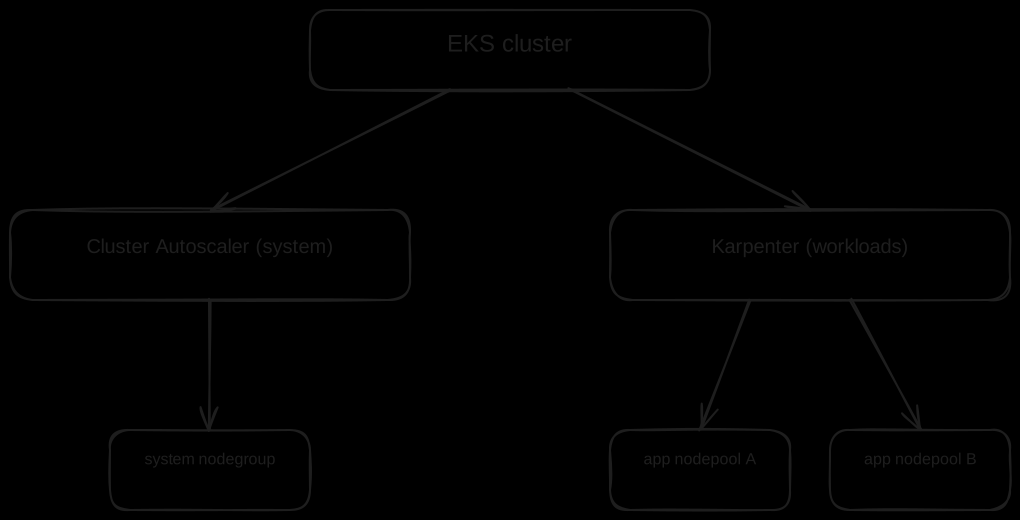
This split is a migration state, not necessarily the destination. The Karpenter guide for migrating from Cluster Autoscaler ends with Cluster Autoscaler scaled to zero replicas and the node group shrunk to a small fixed size for Karpenter and critical add-ons. For a single multi-AZ node group, it suggests at least two instances.
Trap 3: consolidation churns pods at peak traffic
Consolidation is Karpenter’s cost engine, and it runs whenever the math works, business hours included. If you leave out the disruption block entirely, Karpenter fills in consolidationPolicy: WhenEmptyOrUnderutilized, consolidateAfter: 0s, and one budget of nodes: 10%. Older examples show WhenUnderutilized; that is the pre-v1 name, and karpenter.sh/v1 rejects it.
A typical 2 pm scene: by their resource requests, the pods on two nodes would fit on one. Note “by requests”. Consolidation works from requests and scheduling constraints, not from live CPU graphs. Karpenter taints one node, starts a replacement first if the plan needs one, and evicts the pods through the Eviction API. Evicting the only serving replica is downtime for the service, and without a PDB a multi-replica Deployment can lose too many replicas at once during a drain. This is the Salesforce lesson word for word: consolidation could unexpectedly hit single-replica pods.
consolidateAfter is how long a node must stay stable before it becomes a candidate. The timer resets every time a pod is added to or removed from the node. 0s adds no wait after pods are added or removed; a few minutes lets bursty workloads settle. Since the v1 API, the field is required as soon as you write a disruption block.
spec:
  disruption:
    consolidationPolicy: WhenEmptyOrUnderutilized
    consolidateAfter: 5m
    budgets:
      # Always on: 10% of nodes, rounded up to a whole node
      - nodes: "10%"
      # Mon-Fri 09:00-18:00 UTC: no voluntary disruption
      - schedule: "0 9 * * 1-5"
        duration: 9h
        nodes: "0"
Two budgets, and the first one matters as much as the second. Once you define budgets, the default 10% is gone. A lone scheduled nodes: "0" budget is active only inside its window. Outside it, no budget is active, and Karpenter may disrupt any number of nodes at once. The always-on budget closes that gap. When several budgets are active, Karpenter takes the most restrictive one. Budgets limit voluntary disruption only: inside the zero window, Karpenter still launches nodes for pods that can’t be scheduled.
Three more details. Schedules are cron in UTC, with no time zone support, so a team in Berlin has to shift the window and remember that it moves by an hour with daylight saving. To stop only the disruptive work during the day, add reasons: ["Underutilized", "Drifted"] to the scheduled budget; empty nodes then keep going away under the 10% budget. And budgets cover voluntary disruption only: consolidation, emptiness, and drift. Expiration (expireAfter, 720h by default) and interruption are forceful methods that NodePool budgets do not rate-limit. PDBs still shape the drain, but they cannot keep a reclaimed Spot instance alive.
5m is a starting point, not a magic value. Watch your churn for a full week, then decide whether to stretch it or tighten it.
Update, October 2026: Karpenter v1.14 (July 2026) added a third policy,
consolidationPolicy: Balanced. It still removes empty and clearly underutilized nodes, but skips a consolidation when the cost savings are small relative to the pod disruption it causes. If marginal moves are your churn problem, test it on one NodePool before you reach for longerconsolidateAftervalues.
Budgets limit how many nodes Karpenter disrupts. PDBs limit how many pods of one app are evicted at a time:
apiVersion: policy/v1
kind: PodDisruptionBudget
metadata:
  name: frontend-pdb
spec:
  minAvailable: 2
  selector:
    matchLabels:
      app: frontend
This PDB blocks any voluntary eviction that would leave fewer than two healthy frontend pods. With four replicas, two can be evicted at a time. With two replicas, none can, and that is the other side of the trap. Karpenter will not voluntarily disrupt a node while one of its pods is blocked by a PDB. Consolidation skips the node, and so does drift unless the NodePool sets terminationGracePeriod. You see events such as pdb default/frontend-pdb prevents pod evictions. That matches the second Salesforce lesson: overly restrictive or misconfigured PDBs blocked node replacements, so the team added Open Policy Agent (OPA) policies that validate PDBs up front. One more limit: a PDB cannot prevent involuntary disruption. A Spot reclaim or a hardware failure takes the pods anyway.
For true singletons, run a second replica if the app allows it. If it cannot, annotate the pod with karpenter.sh/do-not-disrupt: "true" to block consolidation of its node, or with a duration such as "30m" to protect it only for that long after it starts running. Drift can still replace the node if its NodeClaim has terminationGracePeriod set. The annotation does not block expiration, interruption, node repair, or manual deletion. If you set expireAfter, the docs recommend also setting terminationGracePeriod, so a protected pod cannot hold a node forever. Salesforce describes its own fix as guaranteed pod lifetime features and workload-aware disruption policies; in stock Karpenter, this annotation is the lever of that kind.
A staged rollout
Salesforce published how it staged the move, and that part is worth copying on its own:
- Tooling first. An in-house transition tool cordoned and drained legacy nodes with full respect for PDBs. It could also run in reverse, back to Auto Scaling group scaling, and it was built into the infrastructure CI/CD pipeline.
- Config mapped by code. Auto Scaling group settings were translated into NodePool and EC2NodeClass definitions automatically, across more than 1,180 node pools.
- Stages with soak time. The rollout ran from mid-2025 into early 2026: lower-risk environments first, observation periods between stages, high-stakes production last.
- Slow down when it hurts. Cordoning nodes in parallel caused cluster health issues, so the team switched to sequential cordoning with manual verification checkpoints, rollback, and extra monitoring.
- Boring blockers. Legacy names longer than the 63-character Kubernetes label limit, and ephemeral storage settings that had to be mapped 1:1 from the old volume configuration.
Per cluster, this post’s checklist, built from the traps above, then reads:
- Separate eligibility. A taint plus a required affinity for the system node group, NodePools for everything else (Trap 2).
- Bound every NodePool.
limitsfor the total,instance-cpufor the node size, both capacity types where the workload tolerates Spot (Trap 1). - PDBs and budgets before the first drain. Find PDBs that allow zero evictions and workloads with one replica, and pair the business-hours budget with an always-on one (Trap 3).
- Observe, then take the next stage. Metrics and interruption handling are in place before production moves (next section).
When you shrink the old node groups, go slowly. The migration guide suggests scaling them down a few instances at a time and watching for workloads without enough replicas or PDBs.
Watch the right signals
Karpenter exposes Prometheus metrics on port 8080 by default. The ones that tell the migration story:
karpenter_nodes_created_totalandkarpenter_nodes_terminated_total: node churn, labeled by NodePool and zone.karpenter_nodeclaims_disrupted_total: disruptions byreason(for exampleunderutilized,drifted,expired) and NodePool.karpenter_pods_startup_duration_seconds: time from pod creation to running.karpenter_nodepools_allowed_disruptions: what the budgets allow right now, per NodePool.karpenter_interruption_received_messages_total: messages from the interruption queue, by type.
A churn alert needs increase() over a window, which gives you a count:
# More than 20 node terminations in one NodePool within an hour
sum by (nodepool) (increase(karpenter_nodes_terminated_total[1h])) > 20

# What drives the churn
sum by (nodepool, reason) (increase(karpenter_nodeclaims_disrupted_total[1h]))
The threshold of 20 is a placeholder; take yours from a week of baseline. Do not swap in rate() without doing the math: it returns a per-second value, so rate(karpenter_nodes_terminated_total[5m]) > 5 would mean roughly 1,500 terminations in five minutes. If one Prometheus collects several clusters, add your cluster label to by (...).
Interruptions: one handler per node
Spot interruption handling belongs to Karpenter itself. Karpenter reads an SQS queue that EventBridge rules fill with Spot interruption warnings, scheduled maintenance events, and instance stopping or terminating events. The CloudFormation template in the Karpenter getting-started guide creates the queue and the rules. You then point Karpenter at the queue with settings.interruptionQueue in the Helm chart (the --interruption-queue flag). Without it, SQS-based interruption handling is off; EC2 status checks still run on their own. On a Spot warning, Karpenter starts provisioning a replacement and draining the old node in parallel. Neither is guaranteed to finish before EC2 reclaims the instance.
Do not add AWS Node Termination Handler for the same nodes. The Karpenter FAQ recommends against running both, because the two components handle the same events. The one documented exception is Spot rebalance recommendations, which Karpenter does not act on. If you truly need those, NTH can run alongside, but the docs warn about extra churn, up to a loop where NTH removes a node and Karpenter launches the same instance type again.
Start small, measure, then scale
Salesforce’s sequence scales down well to one team. Start with one non-critical NodePool: internal tools, staging, batch jobs. Measure it over at least one full weekly cycle, so you see peak days and quiet nights. Watch pod startup time, node churn by reason, eviction responses (karpenter_pods_eviction_requests_total is labeled by response code; a 429 means a PDB blocked the eviction or the API server rate-limited it), and cost per workload. Then take the next stage, with a way back.
Back to the guess from the top. The biggest numbers in the case were operational: 80% less manual work, minutes to seconds, thousands of node groups gone. The savings were real and modest. And every problem on the list was about disruption: PDBs, cordoning, singletons. Plan the migration around disruption first. The savings will be whatever your workloads allow, and you will have measured them yourself.
Correction, October 2026: An earlier version of this post said Salesforce cut cluster cost by 70% with sub-60-second provisioning, and attributed a Cluster Autoscaler/Karpenter split to them. The published case says none of that. The numbers in this version come only from the AWS Architecture Blog post linked above.
Related
- Talk: Karpenter in Production: Architecting Cost-Efficient K8s Clusters, AWS Community Day Slovakia, Košice, 2026-03-11.
- Talk: Mastering Kubernetes Scalability with Karpenter, Code Europe, Krakow, 2025-07-01.
- Case study: How Salesforce migrated from Cluster Autoscaler to Karpenter across their fleet of 1,000 EKS clusters, AWS Architecture Blog, 2026-01-12.
- Karpenter docs: NodePools, Disruption, Metrics, Migrating from Cluster Autoscaler.
- AWS Summit Warsaw 2026, session DOP202 (2026-05-06): Integrated AI Agents & Code Assistants with MCP & AWS.
- LinkedIn: linkedin.com/in/vedmich.